LESCO Bill Online Check September 2026 – View & Download Duplicate Bill
Your LESCO bill opens with one number: the 14-digit reference number printed top-left of any earlier bill, in the Consumer Detail box, or the 7–10 digit consumer ID printed directly beneath it. The bill returns your bill month, units consumed, meter readings, arrears, the amount payable within the due date, the due date, and the amount payable after it. Save it as PDF or print it — banks, ATMs, Easypaisa and JazzCash accept the copy.
LESCO Bill Check Online
Enter your Reference Number or Consumer ID to open your latest official LESCO bill.
Official PITC data- The 14-digit Reference Number sits in the top-left block of any previous LESCO bill.
- The Consumer ID is printed in the same block — either number works here.
- LESCO numbers end in U (urban) or R (rural). Leave that letter out — digits only.
- Spaces are added automatically as you type. A CNIC or meter number will not open a bill directly, though a CNIC can recover a lost reference number.
How to Check Your LESCO Bill Online
Four steps, and the whole thing takes about twenty seconds on a phone.
- 1. Pick which number you have. The form opens on Reference No (14 digits), which is what most people use. If your reference number keeps getting rejected, switch to the Consumer ID (7–10 digits) tab and try that instead.
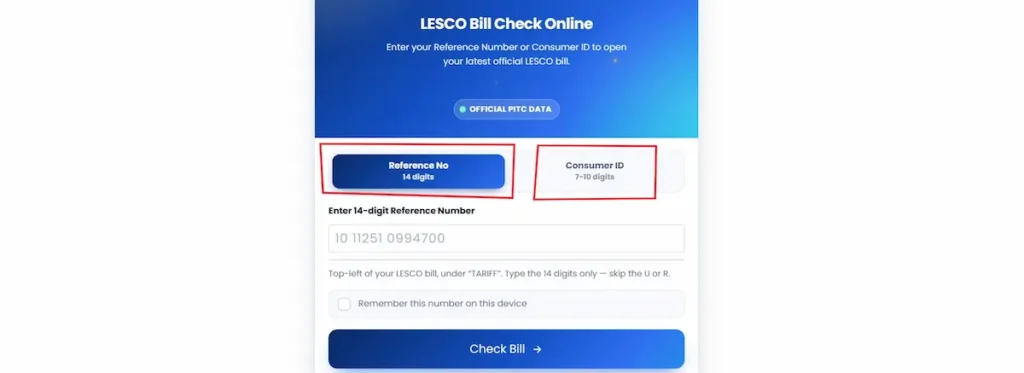
- 2. Type the digits only. Your reference number ends with a U or an R on the printed bill. Leave that letter out — the form wants the 14 numbers and nothing else. Spaces and dashes are not needed either. The greyed-out example in the box (
10 11251 0994700) shows how the number is usually grouped on paper; type it straight through as10112510994700.
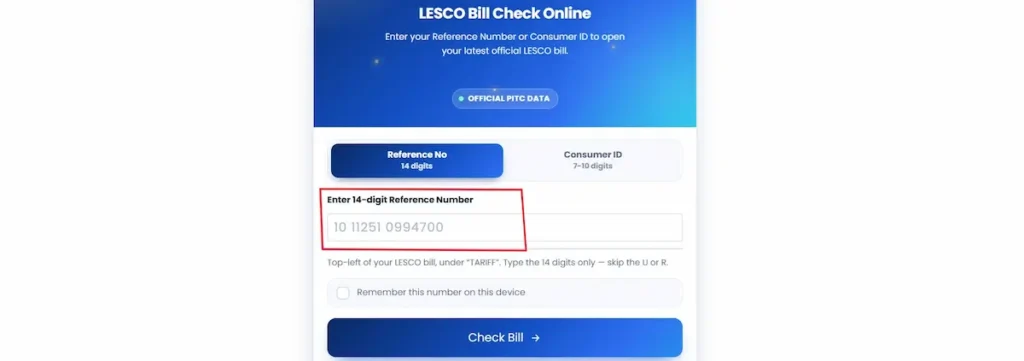
- 3. Tick “Remember this number on this device” if you want to skip the typing next month. That saves the number in your own browser, on your own phone or laptop. It does not go to any server, and it stays with that one device — clear your browser data and it goes with it.
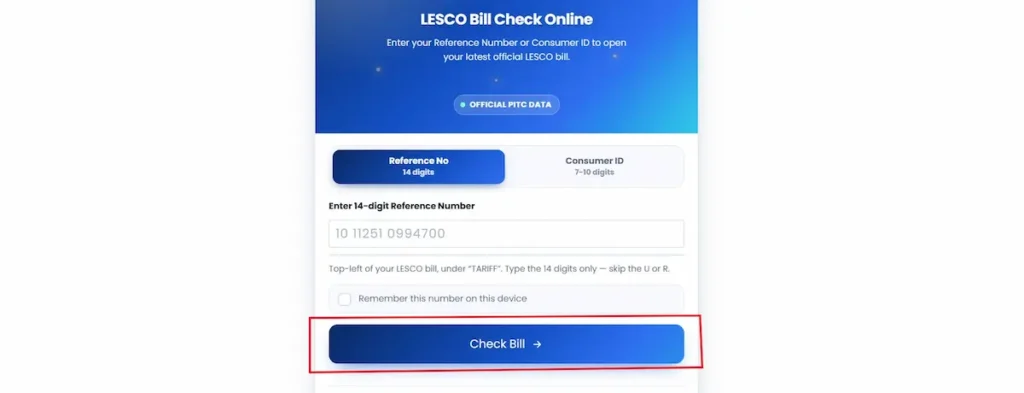
- 4. Press Check Bill. Your bill opens in a new tab on the official PITC portal. The print icon sits at the top-right of the bill. Beside the Bill tab you’ll also find a Tax Certificate tab, which pulls up the income tax deducted through your electricity bills — useful at FBR filing time.
Note: Your bill comes straight from the official PITC record. This is an independent helper, not affiliated with LESCO, PITC, WAPDA or NEPRA, and your reference number is never stored on our server.
Checking by 14-digit reference number
The reference number is a fixed 14-digit code tied to your meter, not to you. It looks like this on a real bill:
REFERENCE NO — 10112510994700
On the payment stub and in the barcode line at the bottom, the same number carries a letter after it — U for an urban connection, R for rural. That letter is part of how LESCO files the connection, not part of what you type. Because the number belongs to the connection rather than the billing month, it does not change. A bill from two years ago works exactly as well as last month’s. If you rent, ask your landlord to photograph any old bill; that one photo covers you for good.
Almost every failed lookup comes down to a single mistyped digit. Fourteen numbers in a row are easy to fumble on a phone keypad. If nothing loads, check the digits against the paper before assuming the portal is down.
Checking by consumer ID
The consumer ID sits directly below the reference number in the same box on your bill:
CONSUMER ID — 3368101
That example is seven digits, which covers most older domestic connections in Lahore. Newer and re-registered connections run longer — up to ten. You will see plenty of pages online stating flatly that the consumer ID is “7 digits,” and that answer sends people away thinking they have the wrong number when they don’t. Count what’s printed on your own bill and enter exactly that.
Either number reaches the same bill. Use whichever one you can read clearly.
“LESCO bill check by serial number” — what people actually mean
There is no serial-number lookup. Nothing on the LESCO or PITC system accepts one.
The phrase comes from the bill itself, where several long numbers sit near each other and people reasonably assume one of them is a serial. In practice, when someone says serial number they mean the reference number — the 14-digit code in the Consumer Detail box. Enter that.
Two other numbers do not work, no matter which site claims otherwise:
- Meter number (printed in the Meter Info block, like
3-P 164254) identifies the physical meter. It has no lookup function. - CNIC will not open a bill. It can, however, be used to recover a reference number you’ve lost — the official routes for that are further down this page.
Where to Find Your Reference Number on a LESCO Bill
Both numbers live in the same place: the CONSUMER DETAIL box, top-left of the bill, under the green LESCO header.
That box holds ten fields in three columns. Left column, top to bottom: Reference No, then Consumer ID, then Name & Address. Middle column: Transformer, Feeder, Sub Division. Right side: Category, Status, San Load, and Tariff. Two of those are worth knowing beyond the lookup:
- Feeder — printed with a code and a name, like
(019108) F.C.College. Load-shedding schedules are published by feeder, not by address, so this is the name to search when you want to know your area’s timings. - Sub Division — like
Ichra. This is the office that handles your billing disputes, meter complaints and installment requests. Quote it when you call and your complaint routes faster.
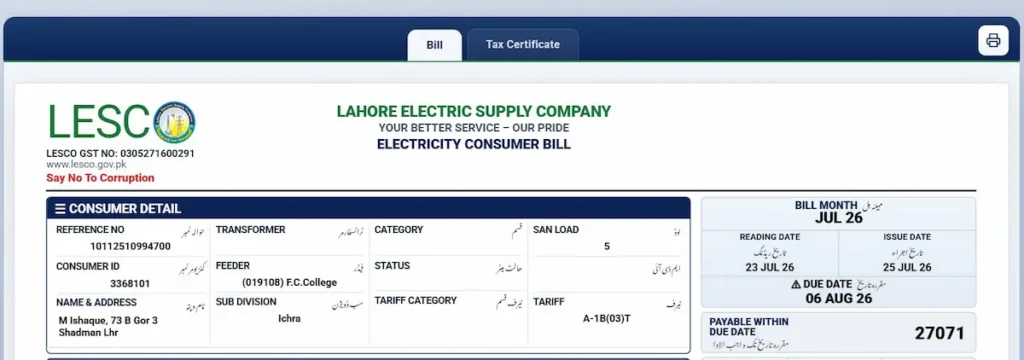
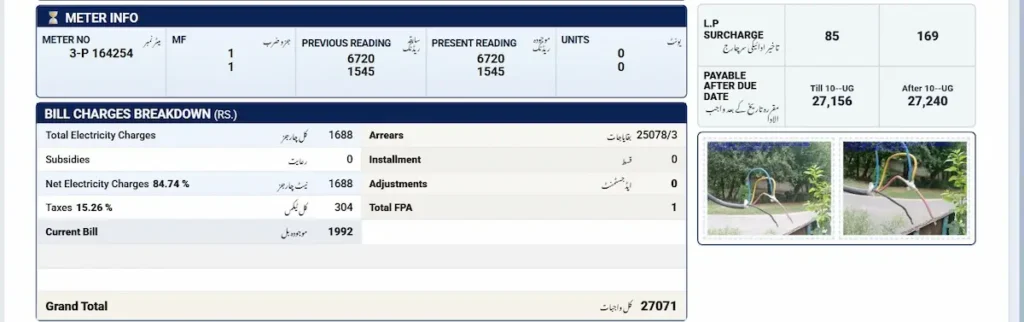
Below Consumer Detail sits METER INFO with your meter number, MF, previous and present readings, and units. Then BILL CHARGES BREAKDOWN. Down the right-hand side you get BILL MONTH, reading and issue dates, DUE DATE, the amount PAYABLE WITHIN DUE DATE, the L.P surcharge, and the amount PAYABLE AFTER DUE DATE.
What the barcode line tells you
If the top of your bill is torn, faded, or the printing has smudged, there is a second copy of everything you need. Look at the payment stub at the bottom, under the barcode. A single line of text runs across it, and it decodes cleanly.
From a real July 2026 bill:
JUL 26 - 3368101 - 10112510994700U - 000027071 - 06 AUG 26 - 000027156 - 10 AUG 26 - 6
Reading left to right:
| Segment | What it is |
|---|---|
JUL 26 | Bill month |
3368101 | Consumer ID |
10112510994700U | Reference number, with the urban suffix |
000027071 | Amount payable within the due date (Rs 27,071) |
06 AUG 26 | Due date |
000027156 | Amount payable after the due date, first tier (Rs 27,156) |
10 AUG 26 | Second cutoff, after which the higher rate applies |
6 | Internal check digit |
This is the line the cashier’s scanner reads at a bank counter. It is also the quickest way to confirm you are looking at the right month’s bill when you have several loose copies in a drawer.
Lost Your Bill and Reference Number? Recover It With Your CNIC
You cannot open a bill with a CNIC. You can use one to get your reference number back, and then open the bill normally. Most pages on this subject stop at “CNIC does not work” and leave people stuck. It does work — for recovery, through official channels.
Option 1 — The CCMS portal (fastest)
The Customer Complaint Management System is run by PITC, the same organisation behind the billing portal.
- Open ccms.pitc.com.pk/complaint
- In the search field, change the dropdown from Reference No to CNIC
- Type your CNIC without dashes
- Press search
Your connection details load, reference number included. Copy it and use it in the form at the top of this page. You are not filing a complaint by doing this — the search runs before any complaint form is submitted.
Option 2 — LESCO’s own CNIC record page
LESCO also runs a CNIC lookup on its MIS reporting server. Enter the CNIC without spaces and the record returns with the reference number.
This page sits on a non-standard port and is not always reachable from every network or mobile connection. If it times out, use CCMS above. Neither one is more official than the other — both are LESCO and PITC systems.
Option 3 — In person
If both portals fail, or the connection was registered under a relative’s CNIC, visit your Sub Division office or the nearest Customer Services Centre with your original CNIC. Staff can pull the reference number from the connection record. Bring the original, not a photocopy.
A word on the sites offering “CNIC bill check”
A number of pages advertise checking a LESCO bill directly by CNIC. No such lookup exists on the LESCO or PITC system, so those forms are collecting identity card numbers for some other purpose. There is no reason to hand your CNIC to a private website.
The two portals above are LESCO and PITC systems. Use those, get your reference number, and check the bill from there.
Download or Print Your LESCO Duplicate Bill (PDF)
Once the bill loads, the print icon sits top-right. On desktop it opens the print dialogue — change the destination to Save as PDF. On a phone, tap the icon or use Share → Print.
Print the full page, not a screenshot of the top. The payment stub carries the barcode and QR code, and those are what a cashier scans.
Is a printed duplicate accepted for payment?
Yes. It carries the same validity as the copy delivered to your door, and bank counters, ATMs, wallets and franchises all take it. The stub even prints a BANK STAMP circle for over-the-counter payment. Print clearly enough that the barcode scans, and keep the stamped stub — it is your proof if the payment fails to post.
Why “WAPDA bill” and “LESCO bill” mean the same document
Lahore’s electricity was handled by WAPDA’s Lahore Area Electricity Board until the utility was unbundled. LESCO was carved out of that board and began operating on 22 March 1998. The name changed; the bill kept arriving. There is no separate WAPDA billing system to look for.
Your LESCO Tax Certificate
Beside the Bill tab sits a Tax Certificate tab. Almost nobody clicks it.
It itemises the income tax withheld through your electricity bills. LESCO collects this for the FBR — a deduction, not a LESCO charge, and money you can adjust against your liability when you file. Businesses use it the same way, and can claim input against the LESCO GST number printed on every bill: 0305271600291.
Open your bill, tap Tax Certificate, save or print it with the same icon. It is issued against the tax year, so pull it once the year closes. Your sub division office issues attested copies on request.
Where Your Bill Data Comes From
LESCO distributes power to your meter, reads it, bills you, and handles complaints. WAPDA is the historic parent and no longer bills domestic consumers. PITC runs the billing system every distribution company sits on. NEPRA regulates — it sets tariffs, approves the monthly fuel adjustment, and hears complaints LESCO failed to resolve.
Because lesco.gov.pk, the PITC portal and this form read the same record, the figures never differ. Only the menu navigation and captcha are removed here. If a figure is wrong, it is wrong at source, and the correction comes through LESCO or NEPRA.
Reading Your LESCO Bill: Every Field Explained
Consumer Detail
The top-left box holds Reference No, Consumer ID, Name & Address, Transformer, Feeder, Sub Division, Category, Status, San Load (sanctioned load in kW) and Tariff.
Transformer identifies the local transformer feeding your connection, which matters when a fault affects only a few houses rather than a whole street. San Load is the load LESCO has sanctioned for you in kW — exceed it regularly and you may be moved to a different tariff category. Status carries a short code describing how the connection is metered.
The tariff code decodes. In A-1B(03)T, A-1 marks a domestic connection, B and the bracketed number give sub-category and load band, and a trailing T means the meter is read for time of use. No T means peak-hour pricing does not apply to you.
Meter Info
Meter number, MF, previous reading, present reading, units. MF is the multiplying factor — usually 1 on domestic meters, so units are present minus previous.
Some bills show two rows. A three-phase time-of-use meter — the number starts 3-P — keeps two registers, one counting peak units, one the rest. Two readings and two unit figures print. You are not being billed twice.
Bill dates and payable amounts
Reading Date is when the meter was read, Issue Date a day or two later, Due Date about two weeks after that. That gap explains a common complaint: a bill issued 25 July, read 23 July, largely measures June. Cutting usage this week will not change the bill in your hand.
Payment prints in three tiers, not two: Payable Within Due Date, the L.P Surcharge, and Payable After Due Date split across two cutoffs. On a July 2026 bill due 6 August, the amount rose to Rs 27,156 until 10 August, then Rs 27,240. Missing the date is not one penalty — it escalates.
Bill Charges Breakdown
Total Electricity Charges is the cost of units used, Subsidies any relief credited, Net Electricity Charges what remains. Arrears prints as amount over months — 25078/3 means Rs 25,078 across 3 months.
Then the levies. LESCO collects these; it does not set them and cannot waive them.
| Charge | What it is |
|---|---|
| GST | Sales tax on energy charges and most surcharges |
| Electricity Duty | Provincial levy on consumption |
| FPA / FCA | Fuel price adjustment, revised monthly |
| QTA | Quarterly tariff adjustment |
| FC Surcharge | Services power sector debt |
| NJ Surcharge | Neelum Jhelum levy |
| TR Surcharge | Gap between NEPRA’s tariff and the notified uniform tariff |
| TV Licence Fee | Fixed monthly levy for PTV |
| Further Tax | Charged to consumers unregistered with FBR |
| Income Tax | Withheld above the threshold; shows on your tax certificate |
| CR | Not a charge — credit carried to your next bill |
The current GST rate on electricity is 18%. Many pages still print 17%, which is out of date. FPA moves monthly and the base tariff whenever NEPRA notifies a revision, so check figures against NEPRA’s notifications rather than any summary.
The 12-month bill history block
Two columns of six months: Month, Status, Units, Bill, Payment, with Deferred Amount and Outstanding Installments beneath.
Find the month it changed by reading down Units, not amounts. Confirm a payment posted — a blank Payment column two cycles after you paid means something went wrong. Check the foot for any remaining instalment balance.
Short status codes appear against some months. They are internal billing markers and do not all mean what people assume. Call 118 and ask what the code on your bill means rather than guessing.
Why Your LESCO Bill Went Up
- 1. You used more units. Compare the Units column across the history block, not the amounts.
- 2. You crossed 200 units and lost protected status. The biggest cause of bill shock, and not what most people assume. Protected status is not a discount on your first 200 units — it covers the whole bill. Go over 200 and every unit reprices at the non-protected rate. Worked examples circulating in 2026 put a 200-unit bill near Rs 3,400 and a 210-unit bill near Rs 8,700 — around Rs 500 for each of those ten extra units.
- Divide Total Electricity Charges by Units. If your per-unit cost roughly doubled while consumption barely moved, this happened. Status is assessed on a six-month average at or under 200 units, so recovery takes sustained low usage, not one quiet month.
- 3. Fuel adjustment against an earlier month. FPA is not charged against this bill’s units. It lands about two months later — a July 2026 bill states in the Urdu note above the history block that it carries adjustment against May 2026 units. That is why a light month can still arrive expensive. Read the month the FPA line names, then check that month’s units.
- 4. Arrears or late payment surcharge carried forward. Subtract Arrears from the total payable; what remains is this month’s actual electricity.
- 5. A quarterly or tariff adjustment. Itemised separately, and unrelated to anything you did.
- 6. A wrong reading or defective meter. Signs: a present reading lower than the previous one, or units far out of line with the last twelve months. Photograph the meter with the date visible and compare against Present Reading.
Estimate Your Bill Before It Arrives
Note your meter reading today and subtract the Present Reading on your last bill. That is your units so far. Divide last bill’s Total Electricity Charges by its Units for your effective per-unit cost, then multiply.
Do this around the 15th — it tells you whether you are heading past 200 units while you still have two weeks to act. For a full calculation, use the LESCO bill calculator.
Peak and Off-Peak Hours
| Season | Peak hours |
|---|---|
| December – February | 5:00 PM – 9:00 PM |
| March – May | 6:00 PM – 10:00 PM |
| June – August | 7:00 PM – 11:00 PM |
| September – November | 6:00 PM – 10:00 PM |
This does not apply to most households. Check two fields on your bill: if Tariff ends in T and Meter No starts with 3-P, you are on time-of-use, and the two rows in Meter Info are your peak and off-peak registers. Otherwise you pay your slab rate whatever the hour, and shifting laundry to midnight changes nothing.
If you are on time-of-use, move the heavy draws — iron, washing machine, water pump, air conditioner — outside the evening window. Timings are revised periodically; confirm the current window on nepra.org.pk.
Paying Your LESCO Bill
Every channel takes the same 14-digit reference number.
| Channel | How |
|---|---|
| Easypaisa / JazzCash | Bill Payment → Electricity → LESCO |
| UPaisa / SadaPay / NayaPay | Same path in each app |
| Bank app (HBL, UBL, MCB, Meezan) | Utility Bills → Electricity → LESCO |
| QR code | Scan the code on the stub |
| Raast | Bank app → Raast → bill payment |
| ATM | Utility payments → Electricity |
| Bank counter | Present the bill; the stub gets stamped |
| Feature phone | Dial *786# |
Confirm it posted. Wait about two days, then check the bill again — a paid marker appears near the amount once the payment reconciles. If it hasn’t after three days, call 118 with your reference number and the transaction ID. A payment that fails silently becomes arrears, and unwinding arrears takes far longer than confirming a payment did.
This site processes no payments and takes no fee.
Checking a Previous Month’s LESCO Bill
The lookup returns the current cycle. For figures across the last twelve months, the history block on any current bill already has them. For a printable copy of a recent month, use the billing history option in the customer menu on the official portal. For anything older or attested, call 118 or visit your sub division office with your CNIC.
People need these for a tax return, a rented property handover, a loan application, or settling which month usage spiked. For tax purposes, check the Tax Certificate tab first.
Bill Not Loading? Errors and Fixes
| What you see | Fix |
|---|---|
| Invalid reference number | Recheck all 14 digits against the paper |
| Invalid reference number | Leave out the U or R — digits only |
| Invalid reference number | Meter numbers don’t work. Use Reference No or Consumer ID |
| Rejected repeatedly | Switch to the Consumer ID tab; enter the full length printed |
| No record found | Bill not generated yet. Try again in a day or two |
| Slow or timing out | Evening load on the portal. Retry later or switch network |
| No reference number at all | New connection — recover it with your CNIC, above |
| Wrong name on the bill | Still valid to pay. Apply for name change at your sub division |
If the bill loads but the figures look wrong, that is a billing dispute, not a technical fault.
Something Wrong With Your Bill? The Complaint Route
| Channel | Detail |
|---|---|
| Helpline | 118, or toll-free 0800-00118 |
| SMS | Reference number and issue to 8118 |
| Online | ccms.pitc.com.pk |
| ccm@pitc.com.pk | |
| Head office | 111-000-118 |
| In person | Your sub division office |
Quote your feeder and sub division alongside the reference number — it routes the complaint to the right office immediately. CCMS issues a tracking ID; save it, because every escalation depends on it.
The deadline decides everything. Raise a billing dispute before the due date. Inside that window a correction can be applied to the current bill. After it, you are pursuing a refund — slower and less certain. Bring a same-day dated photo of the meter, the bill, and your CNIC.
If you cannot pay in full, arrears can be split into monthly instalments. Approval authority rises with the amount — a sub-divisional officer handles smaller balances, an executive engineer larger ones, a superintending engineer larger still. Ask your sub division which officer covers your amount and what it costs, since instalments may carry a financing charge.
Escalating past LESCO. NEPRA hears consumer complaints against distribution companies through its Consumer Affairs Division, with a regional office in Lahore. Beyond that, the Electricity Ombudsman at the Wafaqi Mohtasib’s office takes cases the regulator has not resolved. Both expect to see you went through LESCO first — which is why the tracking ID matters from day one.
LESCO’s Service Area, Circles and Sub Divisions
LESCO supplies five districts: Lahore, Kasur, Sheikhupura, Okara and Nankana Sahib. Billing works identically across all of them, so a connection in Shadman and one outside Nankana check the same way.
Beneath that the network is organised into operational circles, each holding several divisions, and each division a set of sub divisions. Head office is at 22/A Queen’s Road, Lahore.
Your sub division is printed on the bill beside your feeder. That pairing decides which office handles your complaint and which load-shedding schedule applies.
Is There a LESCO Bill Check App?
Yes. LESCO Light, published by PITC on the Play Store, shows bills, load management information, and lodges complaints. Third-party apps mostly wrap the same portal.
- Official app — best if you track several connections
- Mobile browser — nothing to install; the form above works on any phone
- SMS to 8118 — text your reference number, get the amount back. No data or smartphone needed, so on a basic handset it is the only method that works
The Free Fan Replacement Scheme on Your Bill
At the bottom of your bill sits a line pointing to efan.gov.pk — the Prime Minister’s fan replacement programme, run through NEECA.
Old ceiling fans draw close to double a modern DC fan, and run 18 hours a day through a Lahore summer. The scheme swaps them for NEECA-certified five-star fans using up to 70% less electricity. Nothing upfront: the cost spreads across 6 to 18 instalments on your bill, with Rs 1,500 credited per old fan surrendered.
- Who qualifies. Domestic consumers who own the property, hold a valid CNIC, have the bill in their own name, use a SIM registered to that CNIC, and have no more than two delayed payments in 24 months. You must be replacing existing fans — new installations do not qualify.
- Applying. Register at efan.gov.pk or on the official app. The system checks your CNIC, bill and payment history, then shows your financing limit. Pick your fans; an approved manufacturer installs them and removes the old ones. Helpline 1797.
One condition before signing: instalments stay payable even if you are disputing your bill.
Bill Alerts and SMS Registration
LESCO runs a free SMS service. Register your consumer ID and mobile number, and you get a text when the meter is read and another when the bill generates, with the amount and due date.
For the check itself, tick “Remember this number on this device” above and next month is one tap.
Cutting Your LESCO Bill
The biggest saving is a threshold, not a habit. Stay at or under 200 units and you keep protected status; cross it and every unit reprices. Read your meter around the 15th, while there is still time to act.
- Air conditioning makes most Lahore bills. Set it to 26°C and cool the room before evening rather than through it
- Old fans — see the scheme above
- Iron, washing machine, water pump belong outside the evening peak, if your meter is read for time of use
- Standby loads are small but constant
For a larger cut, net metering is the next step. Solar changes the arithmetic rather than trimming its edges.
Frequently Asked Questions
Can I check my LESCO bill with my CNIC?
Not directly — no LESCO or PITC lookup opens a bill from a CNIC. But you can recover a lost reference number with one. Go to ccms.pitc.com.pk/complaint, switch the dropdown to CNIC, enter your number and search. The reference number appears, and you check the bill with that.
What is the difference between the reference number and the consumer ID?
Both identify the same connection and both open the same bill. The reference number is 14 digits and sits at the top-left of your bill in the Consumer Detail box. The consumer ID is shorter, 7 to 10 digits, printed directly above it.
Is a downloaded LESCO duplicate bill valid for payment?
Yes. A printed duplicate has the same validity as the copy delivered to your door and is accepted at bank counters, ATMs, Easypaisa, JazzCash and payment franchises. Print the whole page so the barcode and QR code on the payment stub stay scannable.
Why is my LESCO bill higher than usual?
Most often you crossed 200 units and lost protected status, which reprices every unit on the bill, not just the excess. Other causes: fuel price adjustment charged against a month roughly two cycles earlier, arrears carried forward, or a late payment surcharge.
Do I need to type the U or R after my reference number?
No. Enter the 14 digits only. The U marks an urban connection and the R a rural one, and it appears on the printed bill and barcode line, but the lookup does not need it. Spaces and dashes are not needed either.